How to write an ATS-friendly software engineering resume
Use a single-column layout, standard fonts, real text (not images), and plain section headings such as Experience, Skills, and Education. Avoid tables, text boxes, headers and footers, icons, and multi-column designs, which many parsers merge or drop. Then check the extracted text: if sections or contact details are missing, simplify the layout before applying.
About 6 min read
What an ATS actually reads
An applicant tracking system stores your resume as text. Before a recruiter searches it or a hiring manager skims it, a parser pulls the words out of your PDF and tries to assign them to fields: name, contact details, work history, skills, education. Everything the parser cannot extract is invisible, no matter how good it looks on the page.
This is why the test is the extracted text, not the design. When you upload your resume in PrepRole, the setup step shows you the text our parser pulls out and which standard sections it could name: Roles, Skills, Projects, Education. That is close to what an ATS does. If your Experience section is missing or your contact line is garbled there, a real ATS is likely to miss it too.
It is worth separating two kinds of check. A resume checker judges readability and persuasion for the human; an ATS-style check judges what the machine can extract. The preview is firmly the second kind: it tells you whether the text survives, not whether the content is good.
Reference: We Work Remotely: Resume checker vs. ATS score checker
Layout rules that survive parsing
Single column, top to bottom. Multi-column layouts are the most common cause of scrambled extraction: parsers read across columns and interleave unrelated lines. A clean single column reads correctly in every parser.
Use standard fonts and real text. Common system fonts and normal LaTeX templates parse fine. Problems come from text baked into images, icons used as labels, and decorative fonts that extract as junk characters. If you can select and copy the text in your PDF, a parser can usually read it.
Use plain, standard section headings: Experience or Work Experience, Skills, Education, Projects. Creative headings like 'What I bring' or 'My journey' may not map to any field a parser looks for. Put contact details in the body at the top, not in the document header or footer, which some parsers skip entirely.
- Avoid tables, text boxes, and columns for the main content.
- Avoid icons and graphics for contact details; write them as text.
- Keep dates consistent and on the same line as the role they belong to.
- Export a real PDF from the editor (Word, Google Docs, LaTeX); do not scan or photograph a printout.
Reference: We Work Remotely: The perfect remote resume in 2026
Failures the preview catches
The most damaging failures are quiet ones. A two-column design can merge your job title with your skills list. A skills section built from a table can come out as disconnected single words. A resume where the name and email live in the page header can arrive with no contact details at all.
Creative templates are the usual trap here: two-column colour-blocked layouts look distinctive in a gallery and parse badly in practice. That trade can be worth it only when you hand the resume to a person directly; for anything submitted through a form, plain wins.
Run the check before every application season, not once. Export the PDF, extract the text, and read it the way a search would: can you find your name, your most recent title, the company, and your key skills in the right sections? The Resume step in PrepRole shows exactly this extraction, so the check costs nothing.
Parsing is necessary, not sufficient
A resume that parses perfectly can still be weak. Once the text lands in the ATS, a recruiter searches it and a human reads it. The layout rules get you extracted; the content rules get you shortlisted: recent relevant experience first, specific contributions with results where you measured them, and skills you can actually discuss.
This is also the honest limit of any ATS advice. No formatting trick compensates for thin experience, and no parser score predicts whether a person wants to interview you. Treat a clean extraction as the entry requirement, then spend the remaining effort on what the resume says and how you will defend it aloud.
Tailoring matters for the same reason parsing does: postings are screened for their own terminology. Mirror the exact role title and the skills the posting names where they are true of you, especially across markets where the same job is called different things. Generic titles like 'Software Expert' and keyword-free achievement lines are among the most common reasons capable resumes go unread.
Reference: We Work Remotely: Common resume mistakes remote job seekers make
A sample resume that parses cleanly
The sample below uses a fictional software engineer, a single column, standard headings, and real text throughout. It is deliberately plain: plain is what parses. Adapt the structure, not the fictional content. The PDF and plain-text downloads are in the practice panel below.
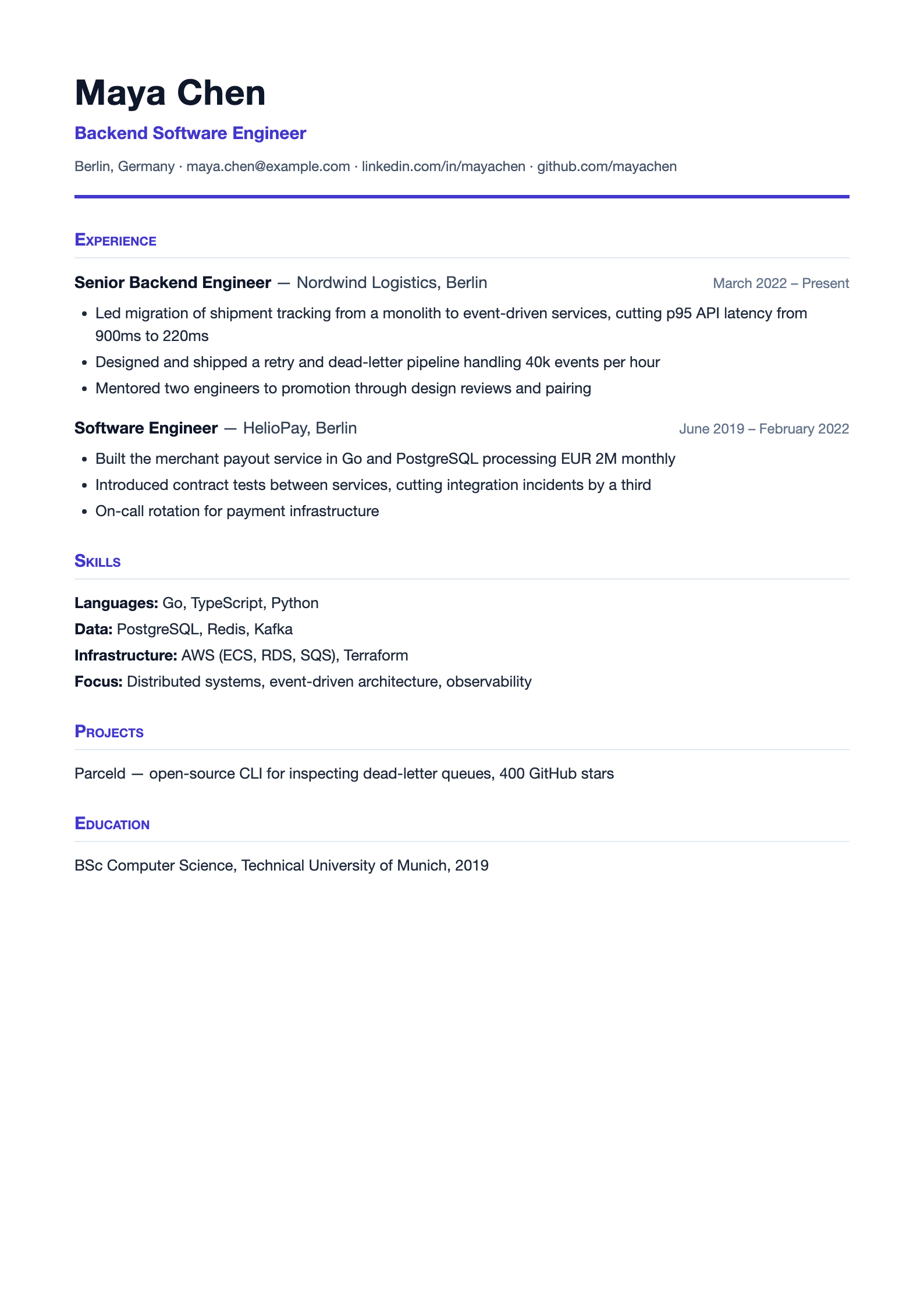
Maya Chen Backend Software Engineer Berlin, Germany maya.chen@example.com | linkedin.com/in/mayachen | github.com/mayachen Experience Senior Backend Engineer, Nordwind Logistics, Berlin March 2022 - Present - Led migration of shipment tracking from a monolith to event-driven services, cutting p95 API latency from 900ms to 220ms - Designed and shipped a retry and dead-letter pipeline handling 40k events per hour - Mentored two engineers to promotion through design reviews and pairing Software Engineer, HelioPay, Berlin June 2019 - February 2022 - Built the merchant payout service in Go and PostgreSQL processing EUR 2M monthly - Introduced contract tests between services, cutting integration incidents by a third - On-call rotation for payment infrastructure Skills Go, TypeScript, Python PostgreSQL, Redis, Kafka AWS (ECS, RDS, SQS), Terraform Distributed systems, event-driven architecture, observability Projects Parceld, open-source CLI for inspecting dead-letter queues, 400 GitHub stars Education BSc Computer Science, Technical University of Munich, 2019
Frequently asked questions
Do I need to pay for an ATS checker?
No. A checker sells a score; what matters is the extracted text. PrepRole shows the text its parser pulls from your PDF during setup, which is the same operation a real ATS performs. If your sections are found and the text reads correctly, the layout parses.
Should I use LaTeX or Word?
Either, if it produces a single-column PDF with real text. Standard LaTeX templates (such as the common academic or moderncv styles in one column) parse well. Trouble starts with heavy custom layouts, whichever tool made them.
Should I stuff the resume with keywords?
Write the skills you actually have using the same terms the job post uses where they are true. Keyword lists with no experience behind them read as padding to the recruiter who sees them after the parse.
Is one page required?
Not for parsing, but it helps the human after it. One page for under about eight years of experience, two at most for senior roles with many relevant positions. Cut old or irrelevant lines rather than shrinking the font.
Practise the next answer
Upload your resume at the Resume step and open the 'How an ATS reads your resume' panel. It shows the text PrepRole's parser extracts from your PDF, the same kind of text an applicant tracking system works from. If sections are missing or the text looks scrambled, simplify the layout with this guide and upload it again.
Sources and scope
Employer sources describe their own processes, which may change. The exercises and illustrative examples are PrepRole editorial guidance, not employer questions or hiring criteria.
- PrepRole: privacy and data controls
- We Work Remotely: Resume checker vs. ATS score checker
- We Work Remotely: The perfect remote resume in 2026
- We Work Remotely: 13 creative resume examples
- We Work Remotely: Common resume mistakes remote job seekers make
- We Work Remotely: Why your resume is not getting interviews for cross-border roles
Related guides
AI feedback can be wrong. A practice Verdict is not a hiring decision.